
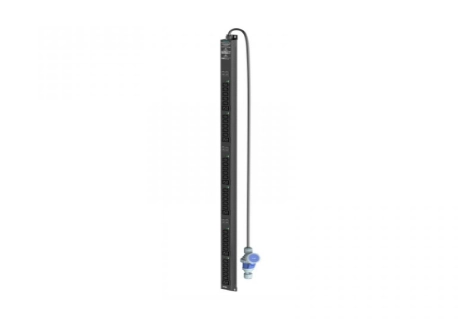
AI computing continues to reshape how data centers manage power at the rack level. Power needs keep rising. Cabinet loads have become harder to predict. Even a small mistake in distribution can lead to overheating, wasted capacity, or an unplanned shutdown. Therefore, a data center PDU must go beyond simply supplying enough outlets. It needs to align with the overall electrical plan. It should display real-time power usage. It must allow safe expansion. It also has to support routine maintenance tasks.
This guide targets data center owners, system integrators, procurement teams, and facility engineers. It shows how to select a data center PDU for high-density AI racks. The focus stays on solving actual operational challenges instead of adding features that provide little value.
Why AI Workloads Are Changing Rack Power Decisions?
Recent data center energy analysis shows that global data center electricity demand rose sharply in 2025. AI-focused facilities saw even faster growth. At the rack level, power densities above 50 kW appear more often. Infrastructure roadmaps for new builds now accommodate rack loads of 100 kW and above
The main concern goes beyond total power alone. AI clusters often run at high loads for extended times. Load swings can happen more suddenly than in traditional enterprise racks. This situation increases pressure on conductors, breakers, connectors, cooling paths, and upstream capacity. A PDU chosen for older cabinets may leave too little room for tomorrow’s computing equipment.
For buyers, the message stays clear. Selection must start with real power behavior. Outlet count and purchase price should not be the only factors.
Start With the Real Rack Load, Not the Nameplate Total
A solid selection process links IT demand directly to electrical limits. Before comparing any products, gather key details. These include expected cabinet load, peak current, input voltage, redundancy design, plug types, cable route, and planned equipment growth. Such information helps avoid two expensive errors. One error involves oversizing every rack. The other involves installing a PDU that quickly becomes a bottleneck after the first hardware update.
Calculate Continuous Load and Practical Headroom
Begin by adding the expected power draw from servers, storage, network devices, cooling support equipment, and any rack-level accessories. Next, separate normal operating load from short peaks or startup current. Never treat the sum of all nameplate ratings as the final answer. Nameplate values tend to be conservative. Real peaks can still occur during intensive computing tasks.
Always keep practical headroom for future growth and unexpected conditions. The exact margin depends on local electrical codes, breaker rules, redundancy targets, and the customer’s operating policy. A metered or monitored PDU can later verify whether the planned margin matches actual usage.
Match Phase, Voltage, Input, and Outlet Mix
High-density racks often benefit from higher-voltage or three-phase input. These options deliver the same power with lower current than low-voltage choices. Still, the PDU must match both the upstream feed and the connected equipment.
Review these items with care:
- Single-phase or three-phase input
- Rated voltage, current, and total kW capacity
- Input plug or hardwired connection
- C13, C19, or other required outlet types
- Horizontal 1U/2U or vertical 0U mounting
- Cable entry direction and cable length
- Breaker quantity and branch arrangement
C19 outlets prove especially useful for higher-power servers. A mixed C13/C19 layout reduces the need for adapters. It also improves cable organization and leaves space for future equipment changes.
Choose the Right Level of Visibility and Control
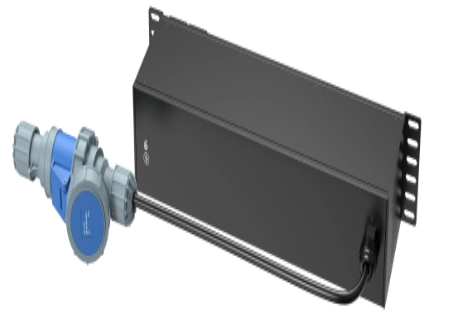
Not every rack needs the same level of intelligence. A small network cabinet may require only stable distribution and circuit protection. A busy data hall, remote edge site, or AI cluster usually needs clearer load data and quicker fault response. The best choice remains the lowest functional level that still supplies the operations team with enough information and control.
Metered PDU for Local Capacity Decisions
A metered PDU shows current, voltage, power, and energy directly at the rack. It helps technicians decide whether new equipment can be added safely. The same data proves useful during commissioning, load balancing, and routine inspections.
Select this level when staff members stay on site most of the time and centralized remote monitoring is not critical. It delivers more useful data than a basic PDU while keeping the system fairly straightforward.
Monitored or Smart PDU for Remote Operations
A monitored PDU sends electrical data to a remote interface. A smart PDU may include outlet-level metering, threshold alarms, remote outlet control, scheduled switching, event records, and links to management platforms.
These functions solve several real operational problems:
- Finding an overloaded rack before a breaker trips
- Identifying idle or abnormal equipment
- Rebooting an unresponsive device without a site visit
- Comparing energy use by rack, customer, or workload
- Tracking available capacity across many cabinets
- Receiving alerts when current or power crosses a limit
For high-density or distributed sites, remote power monitoring can shorten troubleshooting time. It also supplies planners with stronger evidence for future expansion decisions.
Control Heat, Overload, and Cable Risk
Electrical losses become more important as current increases. Poor contacts, loose plugs, undersized conductors, blocked airflow, or crowded cables can create local hot spots. This risk exists even when the rack stays within its total power limit.
When evaluating a high-density rack PDU, look past the basic specification sheet:
- Use conductors, terminals, plugs, and outlets rated for the intended continuous load.
- Choose branch protection that makes faults easier to isolate.
- Place the PDU where airflow and cable movement will not be blocked.
- Avoid unnecessary adapters and tightly bent power cords.
- Use locking or retention features where accidental disconnection is a concern.
- Set warning thresholds below the final trip point so operators have time to act.
- Review temperatures near the PDU, connectors, and cable bundles during peak operation.
A high-power PDU forms part of the overall thermal design. It does not replace cooling systems. However, its materials, internal layout, protection, and monitoring can lower electrical heat risks.
Plan for Redundancy and Maintenance
Critical servers commonly rely on two power supplies connected to separate A and B feeds. This setup works only when the two paths stay truly independent. Connecting both cords to the same upstream branch delivers the illusion of redundancy without actual fault tolerance.
Map each power path from the utility or generator source through the UPS, panel, branch circuit, rack PDU, and server power supply. Confirm that maintenance on one path will not affect the other. For single-cord equipment, an automatic transfer device may be suitable when the wider electrical design allows it.
Maintenance remains important as well. Check whether meters or control modules can be replaced. Verify that firmware and communication settings stay manageable. Make sure spare parts remain available. Clear labels, outlet numbering, event logs, and documented alarm limits make daily operations safer and quicker.
How KAILES Supports High-Density PDU Projects?
At KAILES, we offer a broad PDU product range. It includes basic, metered, monitored, smart managed, and high-power PDU solutions. Our Smart PDU options provide real-time electrical monitoring, remote access, alarms, and outlet control for demanding rack environments.
We also assist customers in reviewing voltage, current, phase, outlet mix, mounting method, and communication needs before production begins. Through our pre-sale service, we deliver technical consultation and project-based design support. After delivery, our after-sale support includes technical guidance, maintenance response, and service process tracking.
Our goal is to help customers choose a data center PDU that fits the real rack instead of forcing the rack to fit a standard product.
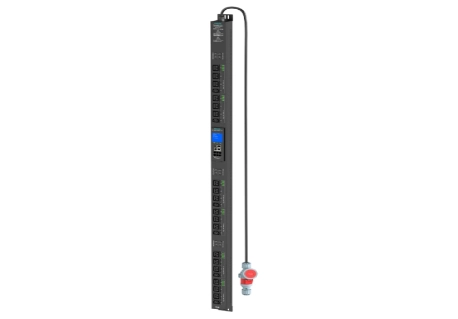
Conclusion
Choosing a data center PDU for high-density AI racks involves more than counting outlets. Begin with real load data, growth plans, voltage, phase, plug types, and redundancy paths. Then decide how much metering, remote monitoring, alarm control, and outlet switching the operations team actually requires. Thermal conditions, cable routing, branch protection, and service access need review at the same time.
A well-selected PDU supplies engineers with clearer capacity data. It provides earlier warnings of electrical problems. It also creates a safer path for future hardware changes. In addition, it reduces stranded power and simplifies maintenance. For AI-ready facilities, rack-level power distribution no longer serves as a minor accessory. It has become a core element of reliable infrastructure planning.
FAQs
Q: What size data of a center PDU is needed for a 20 kW rack?
A: Choose a capacity above 20 kW with code-compliant continuous-load headroom.
Q: Is a smart PDU necessary for every rack?
A: No. Use it where remote monitoring, alarms, outlet control, or energy data deliver real value.
Q: Can a three-phase PDU reduce current?
A: Yes. Three-phase distribution can deliver high kW capacity with lower current per phase.

