
AI data centers are changing rack power planning. A PDU is no longer selected only by counting outlets or comparing prices. High-density servers, GPU clusters, liquid cooling, rapid expansion, and strict uptime targets place more pressure on the power path. A mismatch in voltage, current, phase balance, or outlet type can lead to overload, heat, nuisance trips, or difficult expansion later.
AIDC is often used in project briefs to describe an AI data center. In this article, we use AI data center because it is clearer for most engineering and procurement teams. The goal is practical: help you choose a PDU that fits the rack today, leaves room for growth, and gives your team the right level of visibility and control.
Why PDU Selection Matters in an AI Data Center
The PDU sits close to the equipment, but its selection affects the whole electrical plan. It connects rack loads with panels, switchboards, UPS systems, and backup power. When rack demand rises, a poor choice can create problems that are difficult to solve without rewiring or replacing equipment. A suitable PDU should match both the rack and the wider distribution system.
Current Load Is Only the Starting Point
Start with the equipment list, not a favorite model. Record the number of servers, power supplies, switches, storage devices, and related loads in each cabinet. Note normal and peak power, then add a realistic reserve for future equipment.
For a larger facility, the PDU must also fit the upstream design. A 2000A switchboard may supply several distribution paths, while each rack PDU still needs the correct branch protection, input plug, and load limit. Rack power should therefore be reviewed with the wider distribution plan.
High-Density Racks Expose Weak Assumptions
AI racks are less forgiving than ordinary network cabinets. Higher current raises heat at plugs, breakers, terminals, and cable connections. Large input cables, C13 and C19 cords, and sensor cables can also crowd the rear of the cabinet.
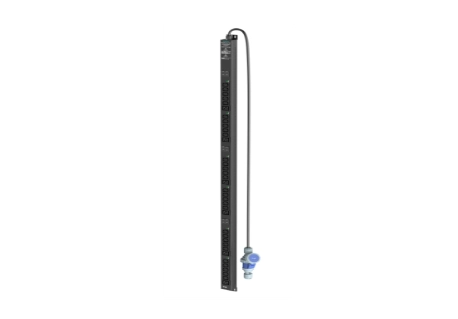
7-Step Checklist for Choosing a PDU
The following checklist is designed for data center owners, electrical engineers, system integrators, and buyers preparing a project specification. Each step answers a buying question. If a detail is not available, mark it as open and confirm it before the order is released. This makes supplier communication clearer and reduces changes during production.
Step 1: Build a Rack Load Sheet
List every device that will connect to the PDU. Include quantity, rated input, typical draw, peak draw, power supply count, and the planned A/B connection. Add a reserve only when it is tied to a real expansion plan.
A useful load sheet should show:
- Rack ID and cabinet height
- Total expected kW
- Input voltage and phase
- Current per feed
- Number of power supplies
- A/B power path
- C13 and C19 outlet demand
- Future load reserve
This gives the supplier a clear starting point and reduces guesswork in the quotation.
Step 2: Select Voltage, Phase, and Current
Match the PDU to the site’s electrical architecture. Depending on the facility, project choices may include 100-125Vac, 200-240Vac, or 346-415Vac systems. Single-phase and three-phase PDUs affect current, cable size, phase balance, and rack density.
Do not choose a higher current simply because it sounds safer. The input plug, cable, branch breaker, outlet rating, and upstream circuit must work together. In higher-density racks, a three-phase PDU may spread load across phases, but the final choice should follow the one-line diagram and project rules.
Step 3: Match Outlet Types and Cable Space
Count outlets by device type. C13 outlets are common for many IT devices, while C19 outlets are selected when the equipment and power cord require a higher-rated connection. The correct ratio depends on the equipment list.
Check the physical side as well. Confirm outlet spacing, cord direction, locking or anti-detachment features, input cable direction, and the distance between the PDU and equipment. A rack can have enough sockets but not enough room for plug bodies and cable bends.
Step 4: Choose the Right Monitoring Level
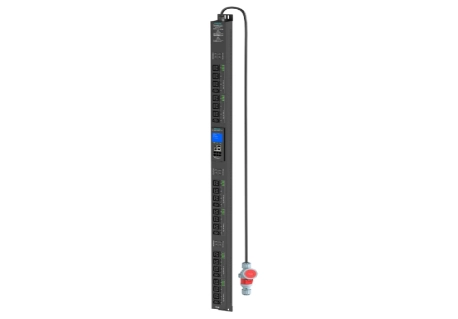
A basic PDU may be enough for a small cabinet with stable loads. A metered PDU adds local readings for voltage, current, power, and energy. A monitored PDU can send power data and environmental information to a management system. A smart managed PDU can add outlet-level control, alarms, timing, and remote restart.
Use this guide:
- Basic PDU: stable loads and simple distribution
- Metered PDU: local load checks and capacity planning
- Monitored PDU: remote data, alarms, and environmental sensing
- Smart managed PDU: outlet control, scheduling, logs, and remote recovery
- High power PDU: high-current racks and power-intensive AI equipment
Choose the level that solves a real response or planning problem. More functions are useful only when the operating team can use them.
Step 5: Plan A/B Power and Transfer Needs
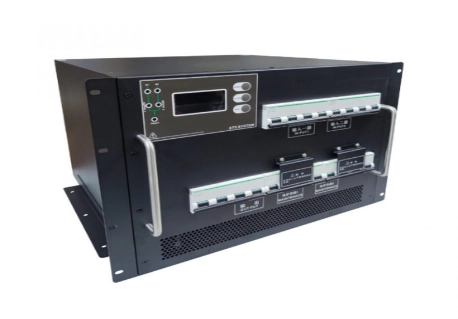
A dual-power server can usually connect to two independent rack PDUs, but the two paths must remain separate through upstream distribution. A single-power device may need a transfer device or another approved method to receive redundant power.
Do not assume that a dual-input PDU automatically provides automatic transfer. Do not connect two sources in parallel unless the project design allows it. Confirm the source, breaker, cable, PDU input, and equipment connection for each path.
Step 6: Check Heat, Protection, and Installation
Power rating is only one part of safe operation. Review the cabinet temperature range, airflow, breaker grouping, surge protection, overload protection, and the material around high-current connection points. Leave enough space for maintenance and cable management.
Installation details should include:
- 0U vertical or 1U/2U horizontal mounting
- Cabinet height and rear clearance
- Input cable route
- Outlet access
- Door and rail position
- Sensor location
- Grounding method
- Service access after installation
A PDU that fits electrically but blocks airflow or cannot be serviced is still the wrong choice.
Step 7: Confirm Custom Design, Documents, and Service
Before releasing the purchase order, review the supplier’s ability to support project-specific requirements. This matters when you need an unusual input system, mixed outlet layout, special current level, custom enclosure length, communication ports, or a connection plan linked to industrial power control.
If you are looking for power distribution unit manufacturers that can do custom builds for specific requirements, ask for more than a product brochure. Request drawings, a technical data sheet, a bill of materials, test information, lead time, and a clear list of standard and customized features.
Match PDU Intelligence to Operating Needs
Not every AI data center needs the most advanced PDU. The better question is what the operations team must see, control, and record after the rack goes live. A clear match between each feature and a daily task usually gives better value. This also helps buyers control project cost without giving up important protection.
When Metering Is Enough
A metered PDU is useful when the main concern is local visibility. The display helps technicians check current, voltage, power, and energy during installation or maintenance. It can suit smaller rooms, stable cabinets, or projects where remote access is handled elsewhere.
When Remote Monitoring and Control Pay Off
Monitored and smart managed PDUs are more useful when the site has many racks, limited on-site staff, or strict recovery targets. Depending on the model, teams may use Web, APP, SNMP, or RS485 connections to view load data, receive alerts, and review events. Outlet control can support delayed power-on, scheduled operation, and remote restart of selected equipment.
For demanding AI environments, temperature and humidity sensing can add another layer of protection. Some advanced designs also support network redundancy and local protection rules during a network outage. These functions should be requested when the project can use them.
How KAILES Supports Project-Specific PDU Selection
在 凯尔斯, we treat PDU selection as part of the rack power plan. Our Product portfolio includes Basic PDU, Metered PDU, Monitored PDU, Smart Managed PDU, and High Power PDU options for different load and management needs.
Depending on the model, our products support 0U installation, C13 and C19 outlet combinations, multiple current levels, and several input systems. Specific values should always be confirmed against the selected model and project documents.
我们的 售前服务 team can review load information, drawings, outlet plans, and communication needs before production. After delivery, our 售后服务 team supports technical response, remote assistance, maintenance, and spare-parts coordination.
结论
Choosing the right PDU for an AIDC starts with the rack load, but it does not end there. Buyers also need to confirm voltage, phase, current, outlet types, cable space, redundancy, monitoring, heat, installation, documents, and service. A high-density AI rack may need a high power or smart managed PDU, while a smaller cabinet may only need basic distribution or local metering. The best choice matches real equipment data and leaves a sensible path for growth. Prepare the load sheet and one-line diagram before requesting a quote. At KAILES, we can use those details to discuss a practical PDU configuration, custom requirements, and project support.
常见问题解答
问: What is the best PDU for an AI data center?
A: A high-power or smart-managed PDU matched to rack load, voltage, outlets, and monitoring needs.
问: Should an AI rack use C13 or C19 outlets?
A: Choose C13, C19, or a mix according to equipment plugs, current ratings, and cable space.
问: Can KAILES provide custom PDU configurations?
A: Yes. KAILES can discuss custom input, current, outlets, monitoring, installation, and communication requirements.

